

BRIQX
eARC Soundbar experience
The best solution for Dolby Atmos soundbar demonstrations
BRIQX eARC Multi Brand experience
Dolby Atmos
and/or eARC soundbars per experience
hot swapping
via the web interface
Optimal sound experience
The BRIQX eARC soundbar experience delivers an impressive audio experience in-store and lets customers hear the difference between products for themselves.
Up to 4 soundbars can be connected simultaneously, with support for audio formats such as Dolby Atmos, 7.1, and 2.0. Each soundbar is controlled individually, so every product is demonstrated at the highest sound quality within its own specifications.
Easy to install and use
The BRIQX eARC solution is designed for quick installation and easy in-store use.
Connect up to 4 soundbars to the eARC port alongside a 4K or 8K media player, and your demo setup is ready to use.
Switch between soundbars, select the content you want, and adjust the volume with the press of a button.
Connected soundbars are hot-swappable and can be replaced quickly without interrupting the installation. The BRIQX retail module also automatically applies the correct settings for each product, even without shop mode.
Easy local management
Easily manage the soundbar experience settings for each installation.
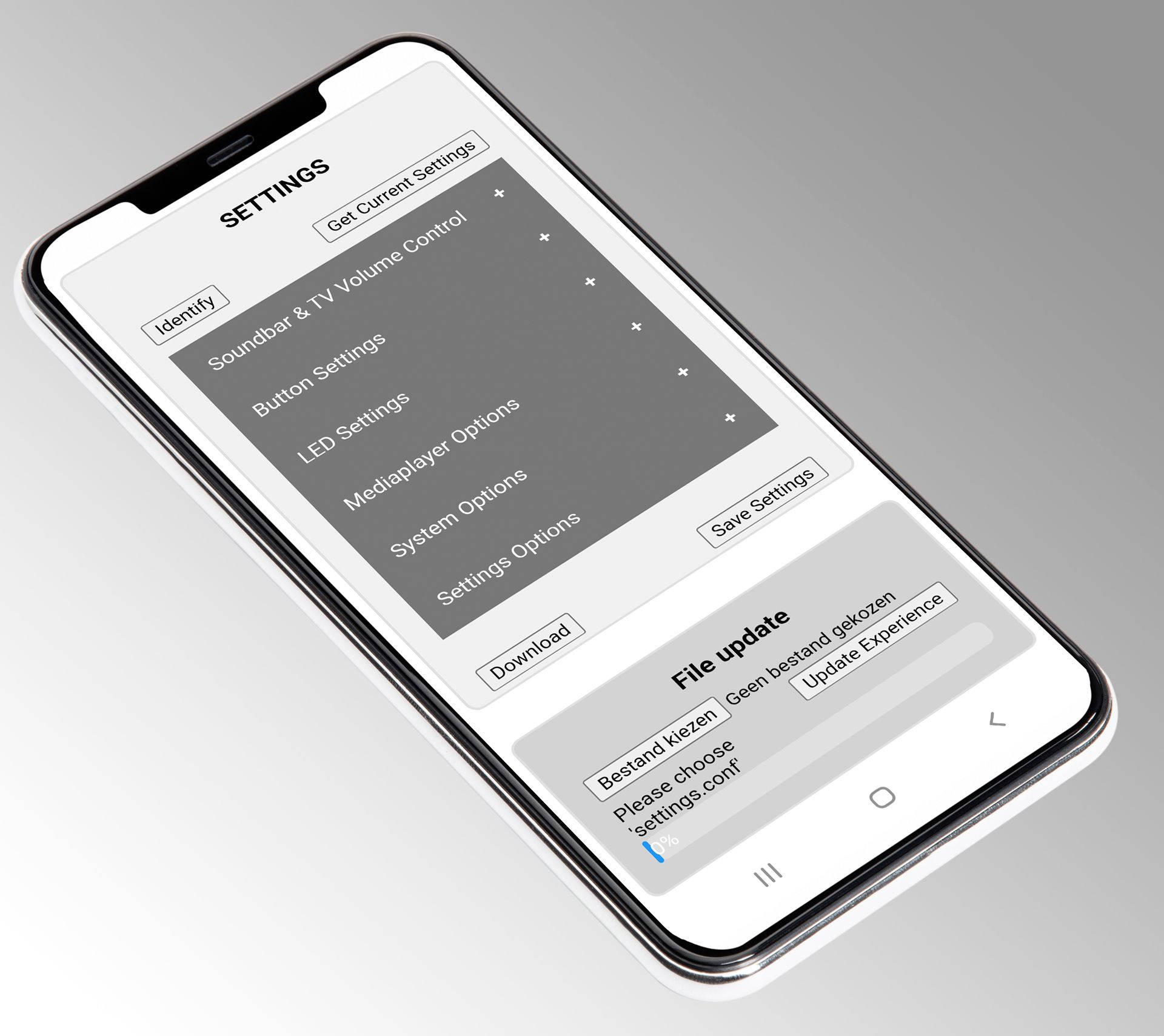
Connect to the BRIQX solution from your phone and adjust settings such as volume instantly. Firmware updates can also be carried out locally.
For quick installation, settings can easily be imported from a configuration file, ensuring every setup works quickly and correctly.
To learn more about Wifi Setup, watch the video setup manual.
Compatibility and expandability
The BRIQX solution uses standard HDMI eARC control, making it directly compatible with virtually all soundbars.
Custom manufacturer controls can be added easily. The firmware is continuously updated and can be upgraded via the Wi-Fi settings menu, so new models are supported too.
BRIQX Dolby Atmos
broadcast soundbar experience
zonder extra systemen
en product demo’s
en schakelt zonder extra hardware
juiste ingang staan
Seamlessly integrate soundbars into your store’s existing broadcast network and create a consistent, high-quality Dolby Atmos experience.
With this solution, you can easily connect TVs and soundbars (eARC) to the in-store network, ensuring product demonstrations work perfectly with your existing content and presentation.
Consistent look and feel
This solution switches seamlessly between the soundbar experience and the in-store TV broadcast system, keeping the visual and audio presentation in your store fully consistent.
Installation
Installation is quick and easy. Connect the HDMI cables and the solution will automatically detect all connected sources.
You can easily switch between the different channels without needing an extra switch.
Retail demo mode
The built-in demo mode automatically manages the TV and soundbar settings.
This keeps products powered on and set to the correct inputs, with no extra steps for store staff.
Frequently asked questions
How do I create an interactive soundbar display in my store?
Use a (BRIQX) controller to control soundbars from different brands via ARC and eARC. Connect controls using buttons or capacitive touch, a touchscreen/tablet, or sensors. Let customers select a model and start the demo with a single tap or press. Play the corresponding product videos on the TV/media player. Add LED highlighting as an option. Update content locally via USB or remotely (optional).
Can I compare multiple soundbars side by side in a single interactive setup?
Yes. Customers can use the controller to choose a soundbar and hear it right away. You can highlight the active model with an LED indicator. When a customer selects another model, the demo starts immediately.
How can customers control the soundbar demo: buttons, touchscreen, or sensors?
Anything is possible. Choose physical buttons, capacitive touch, a tablet interface (API available), or sensors; each can start audio, change the selection, or start a video.
How do I update the soundbar demo content (audio/video) and product information?
Content can be updated locally via USB on the 4K media player; remote updates are also possible through partner solutions.
